Home   |    About   |    Contact               Twitter   |    Facebook   |    Flickr    MCMSfaq.com: Content Management Server Resources
   MCM | SharePoint 2010 & 2007
 
MVP - Office SharePoint Server
 
Best Practices Conference


Content Management Server Resources

The posts on this weblog are provided “AS IS” with no warranties, and confer no rights.
The opinions expressed herein are personal and do not represent those of my employer.


Application Pool Recycle Utility for SharePoint Developers

This freeware application is a System Tray utility for providing quick access to common IIS tasks which are useful on a SharePoint development box. It may also be useful to others working with IIS. In essence, it enumerates the app pools on your box and lets you right click 'em to bounce 'em!

If you are experiencing problems with APM, please see the FAQ.


Version 3.0.0.0 (7th December 2009)

SharePoint 2010 and IIS7 only

apm3a[3]

removal of IIS6 legacy code
addition of new SP2010 services
SharePoint to IIS App Pool name mapping

Download
Application Pool Manager 3.0.0.0.


Version 2.0.0.0 (27th November 2008)
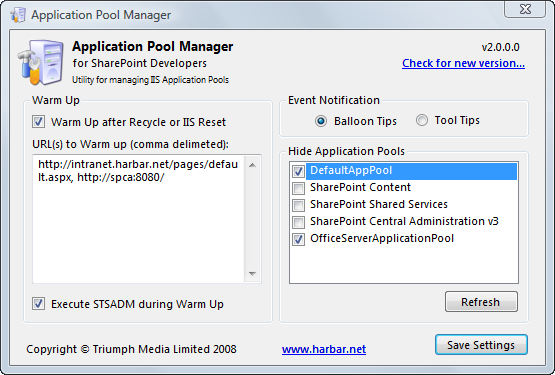
APM 2.0.0.0

Complete rewrite
Vastly reduced working set
Full Vista support
UAC manifest
IIS status detection
IIS6 operations use legacy APIs
IIS7 operations use Microsoft.Web.Administration
Event Logging

Download
Application Pool Manager 2.0.0.0.


Version 1.1.0.0 (23rd May 2008)
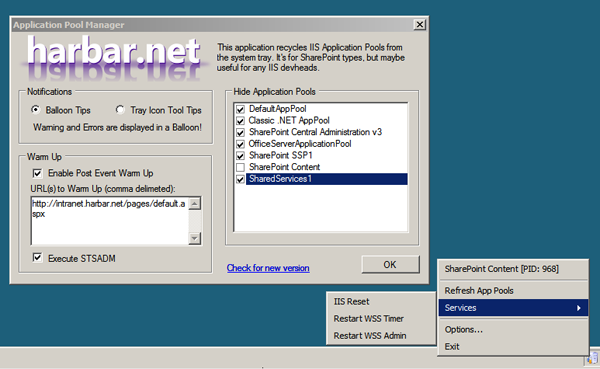
APM 1.1.0.0

New Options Layout
Form does not show on start up
Warm Up and IISReset now run in the background
Option to hide Tool Tips
Ability to hide Application Pools
Restart WSS Timer & WSS Admin Services
STSADM now works on localised versions of Windows Server
Ability to exclude STSADM from Warm Up
PID displayed on context menu for spun up Application Pools
Version Check

Download
Application Pool Manager 1.1.0.0.


Version 1.0.3.0 (10th August 2007)

Added Tooltip to display Process ID if an app pool has spun up. Refreshes in event of recycle.
Does not depend upon iisapp.vbs

Windows 2008/Vista Support: Requires Legacy IIS WMI.

Download
Application Pool Manager 1.0.3.0.


Version 1.0.2.0 (14th April 2007)

Added Support for Windows Vista.
Added ability to refresh the list of Application Pools.
Removed dependency upon the "Warm Up" scripts.
Added ability to "warm up" multiple URLs.
Improved notifications.
Removed 'Recycle' tooltip which caused artifacts on Virtual Machines.
Improved keyboard navigation.
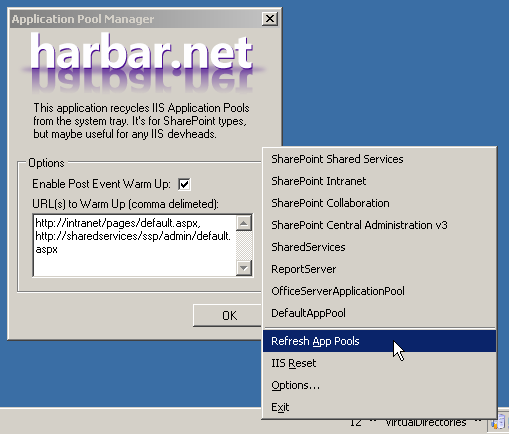
 

Application Pool Manager 1.0.2.0

System Requirements
Windows Server 2003 Service Pack 1 or later, or Windows Vista.
Internet Information Services 6.0 or 7.0 (with IIS6 Management Compatability installed).
.NET Framework 2.0.

Download
Application Pool Manager 1.0.2.0.

Instructions for post event warm ups:
Enter the full URLs (including http:// , /default.aspx or /pages/default.aspx etc) in comma seperated format. Warm ups do not support HTTP 302s. There is no need to install the Warm Up scripts with this version. If you are upgrading from the previous version, remove the Path within applicationpoolmanager.config, this is no longer required.
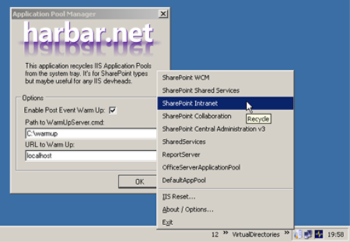


Version 1.0.1.0
Added Event Notifications.
Added ability to perform an IISReset.
Added ability to perform post event "Warm Ups".

System Requirements
Windows Server 2003 Service Pack 1 or later.
Internet Information Services 6.0
.NET Framework 2.0

Download
Application Pool Manager 1.0.1.0


Instructions for configuring post event "Warm Ups".

This requires the Warm Up Scripts posted by Joel Oleson. Download the ZIP file and extract the contents to a folder on your local disk (e.g. c:\warmup).

  1. Within the Options dialog of Application Pool Manager, select the Enable Post Events Warm Up check box.
  2. In the Path to WarmUpServer.cmd text box, enter the path you extracted the scripts to.
    Note: do not include a trailing slash, or the filename itself.
  3. In the URL to Warm Up text box, enter the hostname you wish to warm up.
    Note: do not include http:// or a trailing slash.
  4. Click OK to save the configuration. The configuration is persisted in the ApplicationPoolManager.config file.

Following a IISReset or Application Pool Recycle event, WarmUpServer.cmd will be run, and you will receive notifications of it's progress:
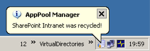
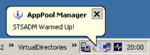
Note that the file startup.bat is redundant and not required. STSADM is run to warm up the admin interfaces by Application Pool Manager. Also there will be a delay whilst the HTTP GETs performed by WarmUpServer are executed before the final notification is displayed.

Don't forget to modify the WarmUpServer.cmd file to reference correct URLs for your SharePoint Central Administration and Shared Services Provider Administration web sites.


What might get done in the next version.

    • Allow associations between Application Pools and Warm Up Hosts.
      e.g SharePoint Intranet App Pool when recycled warms up http://intranet/ but
      SharePoint WCM App Pool when recycled warms up http://wcm/
    • Removal of initial display of About/Options form (if I can figure out how to do that).
    • Activate via keyboard shortcut (if I can figure out how to do that).
    • Add keyboard shortcuts for each Application Pool displayed.
    • Add ability to hide Application Pools (e.g. SharePoint Central Administration v3).
    • Add Start and Stop operations.

If you have feature requests, please leave a comment here. No promises!!


Print | posted on Monday, April 09, 2007 8:42 PM

Feedback

Gravatar

# http://blogs.developpeur.org/phil/archive/2007/04/12/outils-communautaires-pour-sharepoint.aspx

http://blogs.developpeur.org/phil/archive/2007/04/12/outils-communautaires-pour-sharepoint.aspx

4/13/2007 9:45 AM | Pingback/TrackBack
Gravatar

# http://gatweb.fr/lists/billets/post.aspx?list=29f0ece6-dd9b-454b-a6d4-ff5563516758&id=39

http://gatweb.fr/lists/billets/post.aspx?list=29f0ece6-dd9b-454b-a6d4-ff5563516758&id=39

4/13/2007 9:45 AM | Pingback/TrackBack
Gravatar

# http://mhinze.com/links-for-2007-04-11/

http://mhinze.com/links-for-2007-04-11/

4/13/2007 9:45 AM | Pingback/TrackBack
Gravatar

# re: Application Pool Recycle Utility for SharePoint Developers

Would love to see a status when you refresh the app pools, or do an IISReset. At least some kind of message, right now you don't know what's going on, and whether the resets are complete.

Maybe changing the Tool Tip text while it's doing resets?

4/18/2007 2:12 PM | Bob Gusek
Gravatar

# re: Application Pool Recycle Utility for SharePoint Developers

This is truly useful.

Thank you very much.

4/27/2007 4:31 AM | Tony Bierman
Gravatar

# re: Application Pool Recycle Utility for SharePoint Developers

Cool utility Spencer thanks!

5/1/2007 7:08 AM | Andrew Woodward
Gravatar

# re: Application Pool Recycle Utility for SharePoint Developers

This is too cool.
Any chance of being able to also display the pid of each w3wp.exe. I can never bloody find them when I'm trying to attach. Ta.

8/2/2007 7:48 PM | Ian Campbell
Gravatar

# re: Application Pool Recycle Utility for SharePoint Developers

Awesome app, thanks for your work.

Adding command line arguments would be really neat. It would be pretty easy then to add keyboard shortcuts for specific tasks, or even schedule them. Being able to schedule a "warm up" after an IIS scheduled app pool recycle or in the morning right before the site starts getting hit would be very useful.

Thanks again.

9/13/2007 10:19 PM | Ray
Gravatar

# re: Application Pool Recycle Utility for SharePoint Developers

Big fan of this utility.

It would be really cool if you could connect to another IIS server to bounce its app pools.

10/4/2007 2:13 PM | Adam Drewes
Gravatar

# re: Application Pool Recycle Utility for SharePoint Developers

First in class level of excellence.
Thanks mate, this little tool is just what we have been looking for to monitor our pool status.

10/5/2007 9:37 PM | Malcom Randolf II
Gravatar

# re: Application Pool Recycle Utility for SharePoint Developers

Sweet tool and yes, a couple of requests as well:-

1. As before - a scheduling engine built in would be nice (could use Task Manager in Windows possibly though to do it? - I haven't looked at this).

2. The ability to enter a specific user account which the warm-ups run as. This is handy on a server where the admin account that the app is running under hasn't actually got access permissions to the url that is being warmed up.

10/30/2007 8:42 PM | Glenn Laugesen
Gravatar

# re: Application Pool Recycle Utility for SharePoint Developers

Very useful indeed! Thank you very much.

3/1/2008 1:43 PM | hypotheek
Gravatar

# re: Application Pool Recycle Utility for SharePoint Developers

Hi,
Thanks for your tool.
I have a few suggestions.
1. It would be nice if the "work" would actually be done using a backgroundworker thread. (Would not freeze the UI)

2. It'd be nice to associate the warmup urls with specific "app pool"

3/15/2008 2:29 AM | Robert Angers
Gravatar

# 

March Sydney Sharepoint Users Group Notes

3/18/2008 11:06 AM | Art - Life - Code
Gravatar

# re: Application Pool Recycle Utility for SharePoint Developers

Quick question:

If I am deploying something to a live server, does this tool enable me to do so without an IISRESET? Will users of a site be affected if I deploy?

3/18/2008 5:56 PM | Anthony Grace
Gravatar

# re: Application Pool Recycle Utility for SharePoint Developers

Anthony: It depends upon the solution being deployed and which Web Applications it is deployed to. App Pool Manager is not intended to lessen this pain, and is really for development machines.

3/19/2008 10:12 AM | Spence
Gravatar

# re: Application Pool Recycle Utility for SharePoint Developers

Cool stuff. Very useful.

4/17/2008 12:17 PM | Subodh Pathak
Gravatar

# re: Application Pool Recycle Utility for SharePoint Developers

Thanks alot for such a great tool.

5/25/2008 11:47 AM | mostafa
Gravatar

# re: Application Pool Recycle Utility for SharePoint Developers

Really nice tool. And as most users, I would like some added functionality :) The ability to run a post- and pre-process script at iisreset would be nice. Then I could add nlb stop and nlb start commands after the reset and use the tool in our staging environment

5/27/2008 5:00 PM | Kjell W
Gravatar

# re: Application Pool Recycle Utility for SharePoint Developers

Thanks for this great post. I love the explanation. Great

6/25/2008 4:17 PM | vakantie
Gravatar

# re: Application Pool Recycle Utility for SharePoint Developers

Fantastic tool, but one quick question... Will the application error if users that are not in the admin group try to run it?

7/21/2008 9:01 AM | SpittingCAML
Gravatar

# re: Application Pool Recycle Utility for SharePoint Developers

SpittingCAML:

APM requires administrator privileges in order to recycle app pools. If you run it as a regular user it will not be able to enumerate or recycle app pools.

7/22/2008 9:50 AM | Spence
Gravatar

# re: Application Pool Recycle Utility for SharePoint Developers

Thanks. I didn't know that APM requires administrator privileges in order to recycle app pools. I tried to run it as a regular user, but it was not possible to enumerate or recycle app pools.

7/24/2008 1:36 AM | geld lenen bkr
Gravatar

# re: Application Pool Recycle Utility for SharePoint Developers

Awesome

10/13/2008 2:33 PM | Pritesh
Gravatar

#  Application Pool Recycle Utility for SharePoint Developers

Thank you very much !

Now I can work on My Own Test Web Application without having to reset the whole thing but only my Test Web App

10/27/2008 5:37 PM | Manh Le
Gravatar

# re: Application Pool Recycle Utility for SharePoint Developers

Excellent utility - so much quicker than IISRESET! It's on all our developer boxes and virtual machines. Thanks very much for creating it!

11/3/2008 3:00 PM | Lars Nielsen
Gravatar

# re: Application Pool Recycle Utility for SharePoint Developers

I'm getting the error saying I'm unauthorized. I run the app "as administrator" by right clicking the exe file, but after it goes in the system tray I keep getting the error bubble. I'm on Windows 2008, don't know if that makes a difference. It's only when I try to bounce a pool where I get the error. It crawls them fine. Thanks!

11/3/2008 4:53 PM | Phil Wicklund
Gravatar

# re: Application Pool Recycle Utility for SharePoint Developers

Thank you for a great tool

Could it be extended reach IIS processes on remote servers?

So i from my desktop could do a recycle or iisreset remotely.

11/4/2008 6:58 PM | Brian Kenneth Nielsen
Gravatar

# re: Application Pool Recycle Utility for SharePoint Developers

This is just what i was looking for all the time. Thanks for the great post, we realy like it.

Greetings,

2/9/2009 3:57 PM | Hypotheek
Gravatar

# re: Application Pool Recycle Utility for SharePoint Developers

great tool, thanks for sharing, this very useful to us

6/17/2009 11:36 AM | tukang nggame
Gravatar

# re: Application Pool Recycle Utility for SharePoint Developers

Thanks
Very useful tool. I've been so tired of getting the IIS reset all the time ^^

7/27/2009 4:35 PM | Manh Le
Gravatar

# re: Application Pool Recycle Utility for SharePoint Developers

thanks for this nice info, it's so useful for me.

8/2/2009 7:33 PM | Sulumits Retsambew
Gravatar

# re: Application Pool Recycle Utility for SharePoint Developers

I've been so tired of getting the IIS reset all the time

8/12/2009 6:08 AM | Term Paper
Gravatar

# re: Application Pool Recycle Utility for SharePoint Developers

Really nice tool. And as most users, I would like some added functionality :) The ability to run a post- and pre-process script at iisreset would be nice. Then I could add nlb stop and nlb start commands after the reset and use the tool in our staging environment

10/26/2009 1:38 AM | auto insurance quotes
Gravatar

# re: Application Pool Recycle Utility for SharePoint Developers

What a great blog, it's so useful for me. Thanks.

10/26/2009 11:19 AM | Memex
Gravatar

# I'm getting the error saying I'm unauthorized.

I run the app "as administrator" by right clicking the exe file, but after it goes in the system tray I keep getting the error bubble. I'm on Windows 2008, don't know if that makes a difference. It's only when I try to bounce a pool where I get the error. It crawls them fine. Thanks!

10/31/2009 3:24 AM | business directory
Gravatar

# re: Application Pool Recycle Utility for SharePoint Developers

Adding command line arguments would be really neat.

11/18/2009 5:32 AM | Bissel

Post Comment

Title  
Name  
Email
Url
Comment   
Please add 4 and 8 and type the answer here: