I finally got around to getting myself a new network tune box. Those of you who know me will be aware I am somewhat of a muso and I have a distinctly uncompromising stance when it comes to “better sound”. For a while I was using a Squeezebox Duet, which is OK but leaves a lot to be desired. So the hunt for a proper network tune box commenced about this time last year. I’m not interested in a all in one media player, I want a dedicated device for tunes and that doesn’t need a television to control. Seriously, who listens properly to tunes with the television on? that’s just not right.
My tunes are all in FLAC stored on a Windows Home Server, which is also running the Asset UPnP Server from Illustrate. Asset UPnP is a dedicated music server and beats the usual suspects hands down in every key regard. Unfortunately WHS 2011 still doesn’t support streaming FLAC, but even if it did, I’d probably still use Asset. So I needed a box that could play that stuff, and met my other requirements.
Why not stick with the Squeezebox? Well it’s a nifty little device for sure but it has some key limitations. Unfortunately it only supports up to 48kHz and I am increasingly using higher bitrate source material. The new Touch can do better, but that’s no good - I wasn’t going to wait for them to refresh the Duet. Then there’s the DAC – it’s pretty lame when you hook it up to a system where you can hear the difference. So with the Duet I had the SPDIF hooked up to my amp to use it’s DAC, which is very good indeed, but of course that ties it to the amp. Then there’s the software, it needs it’s own server. It’s kinda OK, but when you have a large library it’s slooooow. Then there’s the controller software for it’s remote and iPad, PC etc. That’s actually kinda neat and one of the better ones, but I don’t want to compromise on sound just for this. So in the bin the Squeezebox goes. I coulda stepped up to the Transporter, but at over £2000 it’s just not worth it.
I lusted over the Linn Akurate and Klimax for a while and briefly considered the Sneaky Music, but the price is hard to justify, and frankly the controller software is very lame. Linn make great gear, but it just wasn’t up to scratch within a reasonable budget and a lot of hassle.
So in the end I plumped for the very affordable and excellently spec’d Cambridge Audio Sonata NP30. Here it is sat comfortably in the rack:
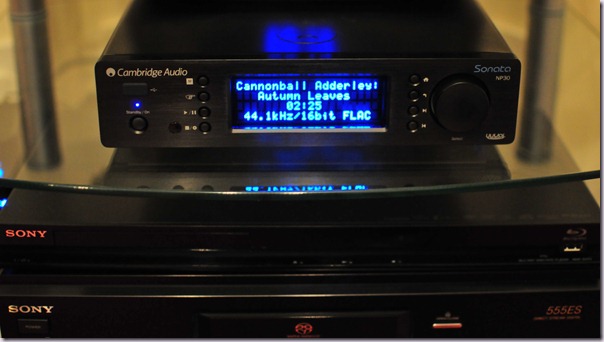
Looks wise it’s kinda nice, and as you’d expect follows the Cambridge Audio design, this one intended to be matched with their Sonata line. I have it hooked up to the amp (a Sony TRVA555ES, a kick ass piece of kit the like of which aren’t made any more) using analog outs – the NP30 doesn’t have “balanced” connectors which I’m not into anyway. I also have the SPDIF hooked up for comparisons when using crappy formats and also for the small number of surround sound recordings I have. It is also hooked up to the LAN and it has wireless as well.
It really doesn’t do much. It just plays tunes. But it plays them very well indeed. It can also stream internet services (radio and such) which I’m not that interested in, but useful for things like SomaFM. Those of course are all in MP3. For the real deal it will work with any UPnP server. It’s plays everything I can throw at it. The DAC is a nice one, the Wolfson WM8728 which can go up to 24-bit/96kHz. It sounds pretty warm, it’s very nice output especially at reasonable levels. Time will tell if it warms up more and beats the amp (unlikely), but there may come a time when the amp is replaced.
Overall sound quality is excellent, very good dynamic range. Sweet and rock solid, it’s what you could call an “in the pocket” player.
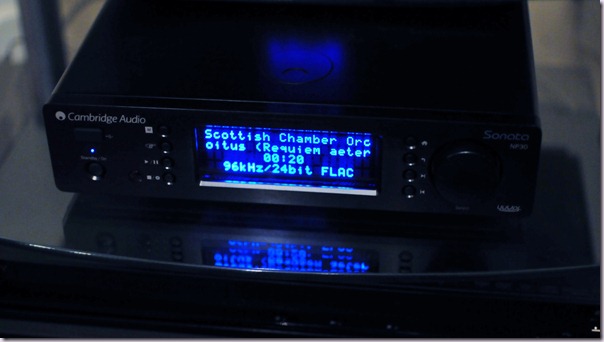
It’s basically silent, which is just the ticket. Streaming over the WLAN works great, but I’ll stick with the LAN I think! It has a mode where it will try LAN first then WLAN etc. Load times are extremely quick. There’s no lag waiting for anything thus far with a very large library of tunes! It of course grabs a bunch of data, pull the LAN out and it will continue to play for a few minutes before failing.
The NP30 comes with the standard Sonata remote, which is OK, but you are not really going to be using this to control the device as browsing the collection from the display is as awkward as it was on the very first network music players years ago. The front panel has a jog wheel which is much better. The display can be dimmed as well, but unfortunately it cannot be turned off.
Cambridge Audio ship a thing called uuVol, an iPhone/iPad remote. It’s not fantastic and it’s obviously early doors in terms of it’s development, but it’s perfectly adequate. Now an interesting bugette here is that if the NP30 is on the LAN, uuVol will struggle to connect. This doesn’t happen if both the NP30 and iPad are on the WLAN. Cambridge Audio are aware of the problem and working on a fix.
The only other gripe I have is it can’t do gapless playback. For concerts that is just crap. Cambridge Audio say they are working on it, but it’s “hard to do”. That’s kinda annoying as a £100 Squeezebox can do that no problem. But of course the squeezebox jitters like crazy and has a fetish for rebuffering so it’s not that easy!
So overall I'm very happy with it so far. It is a simple device, but that’s just how real audio gear should be. The three things I want fixed are the remote app LAN issue, gapless playback and the ability to turn off the display. But it’s a very nice tune box even with those issues, and so if you are into these sorts of things, I’d encourage you to take a listen to one.
It’s that time again folks, Conference craziness season is back with a vengeance after the summer. When is it *not* conference season I hear you chuckle! Anyways, I have the privilege of speaking at a number of events between now and the end of the year. It’s always a great deal of fun to meet folks at conferences and hear about their SharePoint experiences. I look forward to seeing you one of the following events.
TechReady 13
25-29 July - Seattle, WA
http://www.mytechready.com/
This event is for Microsoft employees only. I’ll be in Redmond for some other work and will be presenting a developer focused session.
SharePoint 2010 Site Provisioning Smack Down: Site Definitions vs. Web Templates, the What, When, How and Why.
Debate still rages around the “right way” to approach provisioning of SharePoint sites especially in relation to large scale deployments. This session will cover the various approaches to site provisioning available, looking at their pros and cons and associated considerations. Guidance around what approach to use when, and why will also be provided.
SharePoint User Group UK (SUGUK)
4th Annual Golf Day
11th August - Ullesthorpe, Leicestershire, UK
http://suguk.org/forums/thread/26940.aspx
The golf day is great fun, a round of golf and some user group sessions. My partner in crime Steve Smith will also be presenting.
The rational guide to Kerberos with SharePoint 2010
In this session Spence will drill into the cloudy often ignored world that is Kerberos and will show that Kerberos is not something to be scared off, but something to embrace providing you approach it right. Full scenario walkthroughs of Farm traffic, End User sign in and Service Application delegation to external services will be demonstrated live!
Tech Ed New Zealand
24-26 August - Auckland, New Zealand
http://newzealand.msteched.com/
I’ve always wanted to visit New Zealand but it’s been about four years before I’ve been able to make it happen. I’ll also be staying on for a week after the event to deliver Combined Knowledge’s Advanced Admin Boot Camp.
Real World Service Application federation with SharePoint 2010
SharePoint 2010 provides architects with a compelling new model for service publishing and federation, opening up exciting new approaches to farm design. This session will cover how Service Application Federation plays out in the real world, based upon early enterprise adopters. Learn how to approach the design of a enterprise services farms, provide true scalability and discover the constraints for each service application which can be published, including global deployment considerations. Related aspects such as Security, High Availability and performance will also be covered. This session will be split 70/30 between lecture and demonstrations.
Rational Guide to SharePoint 2010 User Profile Synchronization
The incredibly popular session with new content updated for SP1 and the latest CUs. Get the real deal on configuring User Profile Synchronization in SharePoint 2010 in this demo and best practices heavy session. This session will cover the architecture of the new User Profile Synchronization capability in SharePoint Server 2010 and provide a walkthrough of the configuration requirements and setup eccentricities. This session will be split 70/30 between demonstrations and lecture.
SharePoint Conference
3-6 October - Anaheim, CA
http://www.mssharepointconference.com/
The big daddy. It’s gonna be an awesome show. Be there!
Enterprise Deployment Considerations for the User Profile Service Application
Deploying the User Profile Service application presents unique design considerations for architects. Learn best practices from real enterprise deployments and understand the key architectural considerations in terms of high availability, scalability and geographic deployments. Also covered will be general UPA related best practices in terms of synchronization, policy and privacy and leveraging social features inside the enterprise.
Best Practices for Multi Tenancy
SharePoint 2010 delivers compelling new infrastructure features for those wishing to host multiple customers on a shared platform whilst retaining confidentiality, integrity and availability. This session will cover how multi-tenancy can benefit all sizes of deployment from a basic farm to the largest such as SharePoint Online. Learn how to approach the design of a multi-tenant deployment and to configure and operate multi-tenant infrastructure, create Member Sites, Subscriptions, Feature Packs, and Service Application Partitions. Understand the key design choices and development required. This session will be split 50/50 between lecture and demonstrations.
Capacity Planning your SharePoint 2010 deployment
One of the biggest challenges for architects is how to approach capacity planning and management for a SharePoint 2010 deployment. In this session we will cover approaches to the problem space and devise the appropriate capacity management strategy for SharePoint 2010 implementations. Learn how to manage capacity throughout the deployment lifecycle and adopt best practices from field experiences.
European SharePoint Conference
17-20 October - Berlin, Germany
http://sharepointeurope.com/
I’ll be co presenting one of the keynotes with Mirjam van Olst, and generally loitering around the rest of the conference.
Keynote 3: Successful Deployment: Lessons Learned From the Field
with Mirjam van Olst
Take a whirlwind tour of lessons from the field since the release of SharePoint Server 2010 to understand the key factors of a successful roll out in the enterprise across planning, architecture, implementation, deployment and operations. Based upon some of the most common pitfalls and worst practices of early adopters and the key challenges they have faced, the keynote will detail the lessons learnt alongside best practices to help ensure a successful deployment. Ideal for all disciplines, including Information Workers, Business Decision Makers, Developers and IT Professionals.
SharePoint & Exchange Forum 2011
14-15 November 2011 - Stockholm, Sweden
http://www.seforum.se/
My first visit to Sweden which I am very much looking forward to.
Sessions TBD but likely to include Kerberos, Sandbox for O365, UPA, Multi Tenancy. I may also co present with my buddy Steve Smith once again.
That’s my lot for the rest of the year! I look forward to seeing you at one of the above events.
.